
Product update
One dashboard for your whole fleet with context variables
Alexis Leibbrandt

Dashboards now support context variables. Add a device selector to the dashboard header, and every connected widget updates to show data for the device you pick.
Until now, monitoring twenty identical air quality sensors meant twenty dashboards, or one dashboard where you rewire every widget each time you want to look at a different room. The Dashboard Context Variable fixes that.
Set a device once at the dashboard level, and every widget bound to the variable follows. Build the layout once and reuse it across your whole fleet of similar devices.
Versatile device selector
The device selector lives in the dashboard header, so anyone viewing the dashboard can switch devices without editing anything. You can also drive the selection straight from a Table, Map, Image, or Floorplan component. Click a marker on the map or a row in the table, and the rest of the dashboard reloads for that device. An overview of every sensor in a building, with the full detail view one click away.
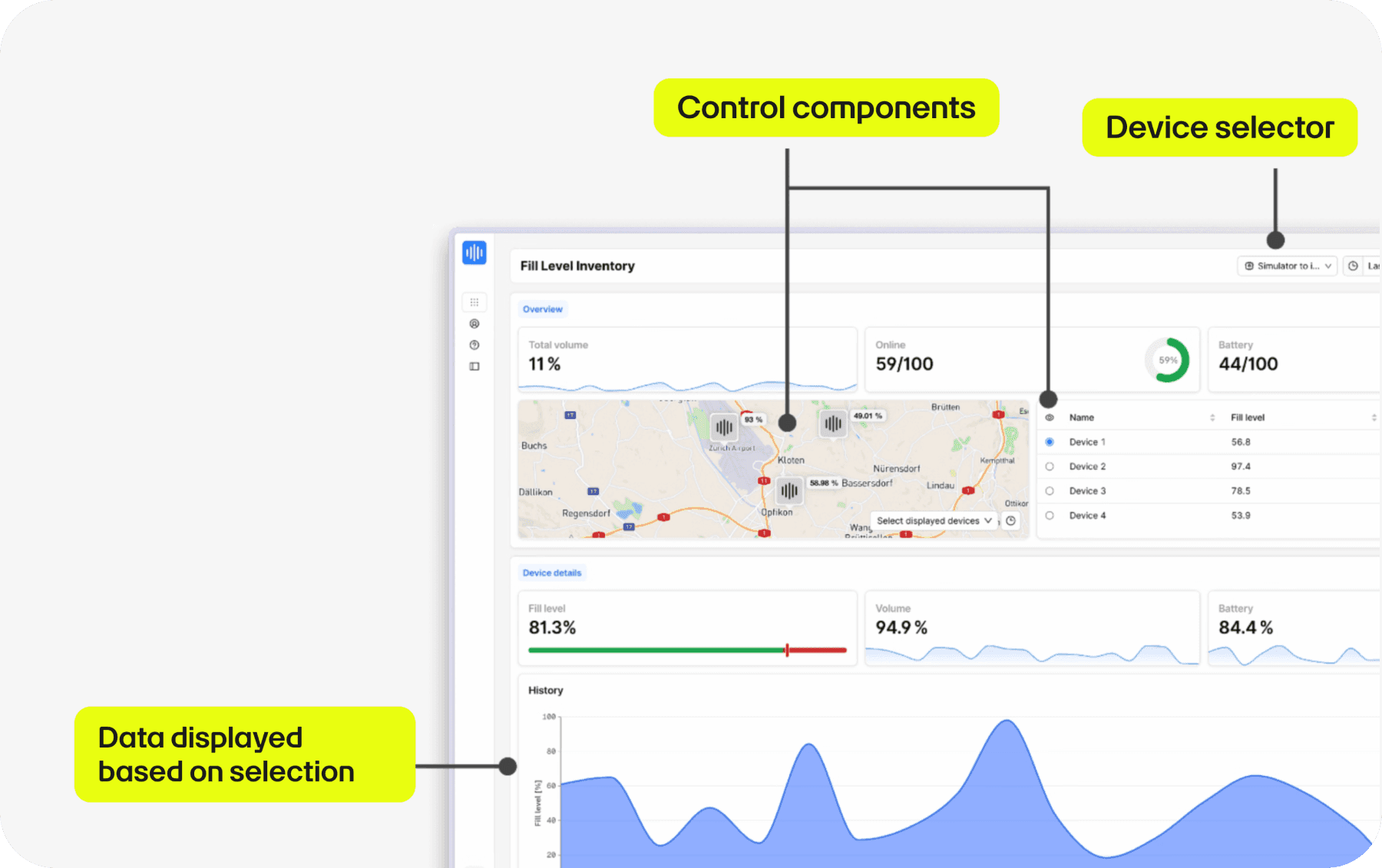
Where to use the dashboard context variables
Meeting room air quality across a floor of identical sensors. Machine monitoring on a production line. Energy meters across a portfolio. Anywhere you run the same device type in many places, one dashboard now covers all of them.
Setting it up
Three steps in the Dashboard Builder:
Enable Use dashboard context variable in your dashboard settings and choose a tag to define the scope. Only devices with this tag will show up in the selector.
In each widget you want to link, open the Source tab, set the device to Variable value, and the widget will follow whatever device is selected.
Optionally, turn any Table, Map, Image, or Floorplan component into a control by ticking Use as variable control component. That lets viewers set the device by clicking inside the component itself.
The Dashboard Context Variable is available on Expert plans.
Stay up-to-date with the latest features at akenza on our Changelog.
Discover more blog posts


Need help with your IoT project?
To learn more about how akenza can help you build smart solutions with ease, contact us or directly sign up for a free trial today.
Changelog
If you want to follow the latest updates and upcoming features of akenza in real-time, be sure to check our changelog.